Seedance 2.0 Fast
Time stop product ad from four reference images
Recorded clip: 13s · 9:16 · four reference images · 480p
Show the original prompt from this run
This run used a Chinese-language prompt. Read it on the Chinese page.
AwakePix
Upload a product photo and turn it into a short product-selling video: one clear scene, one motion idea, and a result you can judge before making more.
A useful brief is simple and visible: name the product, choose one movement, and keep the rest of the frame consistent. Describe the subject, camera, light, and ambience in one continuous shot so you can review each detail afterward.
Keep a small product fully visible, with its packaging, logo, color, and key details clear.
First use a text edit to place the product on a table, in a bathroom, or on a shelf, then send that product image to the video generator.
Choose a slow push-in, a small turn, or a light change; select 9:16 when the current model supports it, otherwise use adaptive aspect.
Confirm the current credit quote before generating. Afterward, check the logo, packaging, color, and details before preparing captions or publishing.
Begin from the uploaded product image: keep the small bottle, white label, logo, package color, and tabletop position unchanged. In a 9:16 vertical shot, make a slow, small push-in while keeping the bottle sharp; soft window light passes across the label and the background stays gently out of focus. No cuts, added text, or new logos.
Show a hand picking up a bottle, a bag moving with a walk, or light catching a product already placed in its intended setting.
Use text to place the product in another display setting, then use one slow movement to check the composition, packaging, and light.
Pair a slow push-in, controlled light, and a clear hero product to review the logo, color, and packaging details.
When you need several ordered reference images, choose a currently available model that supports them; for a single-image draft, choose a current single-image model. Review the generator's quote for the selected model, duration, and resolution before submitting, and expect queue times to vary. The free five-second 480p preview includes audio and no watermark, requires sign-in and email verification, is limited to one lifetime preview per account, and is for personal non-commercial use only; availability may vary at peak times. Paid credits are required for advertising, with rights to your product, logo, and people in the source material and compliance with third-party terms. Keep the brief to one continuous shot.
Each card keeps the source frame, finished clip, original prompt, and recorded settings from its historical run. The clips use their own original prompts; the product video prompt above is a separate, simpler example. Check the generator for current settings and pricing.
Seedance 2.0 Fast
Recorded clip: 13s · 9:16 · four reference images · 480p
This run used a Chinese-language prompt. Read it on the Chinese page.
MiniMax H3 Max
5s · 768p · 9:16 · 40 credits
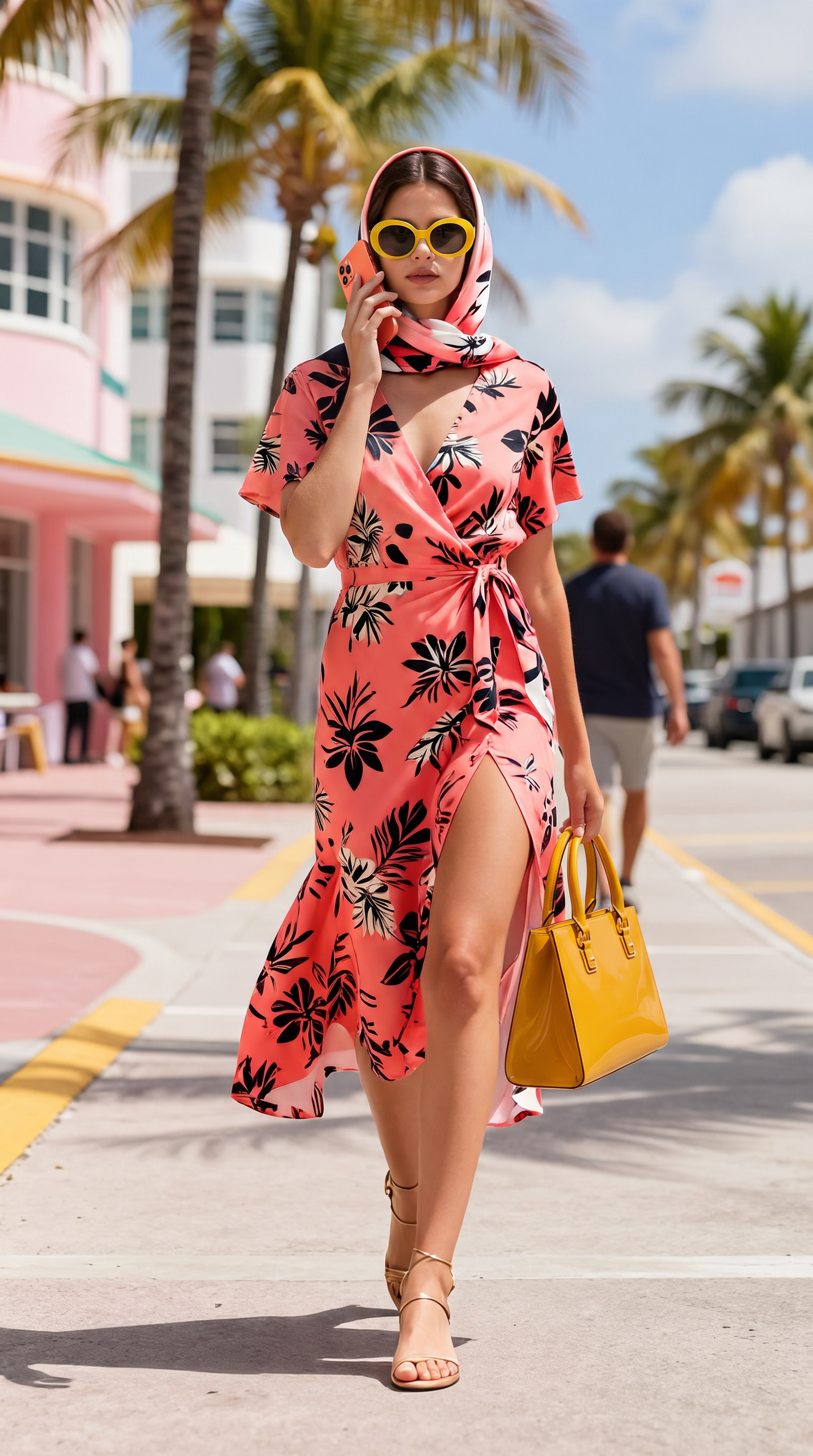
Begin from the uploaded frame, keeping the woman, her floral dress, headscarf, the yellow sunglasses, the coral phone, the yellow handbag and the sunny street background consistent. A man in a dark jacket walks in from the right edge and collides with her shoulder. On impact her sunglasses fly off her face, the phone leaves her hand and the handbag is knocked out of her grip; all three products launch outward through the air in different directions, tumbling in slow motion, staying sharp and undistorted. The camera pushes in at a moderate amplitude and a slow steady pace. Street ambience with a sudden thud on impact.
Start with a sharp, well-lit image where the product is clearly visible and not hidden by hands, glare, or a heavy crop. Leave a little room around it when you want a camera push-in or product movement.
Seedance 2.0 Fast accepts up to four ordered reference images. Other current paid models use one starting image, so choose the clearest frame for the product and composition you want to preserve.
The model, duration, and resolution determine credits and waiting time. Choose a currently available model and setting in the generator and review its live quote before submitting; the sample cards below preserve recorded historical runs and do not represent current pricing.
Advertising and other commercial work must be generated with paid credits. You also need rights to the product imagery, trademarks, and any recognizable person or likeness in the source material, and must follow third-party model and advertising-platform terms; the free tier is personal and non-commercial.
No subscription or card is required: sign in and verify your email to receive one lifetime first free single-image preview per account. Confirmed failures do not use it. The free preview is five seconds at 480p, includes audio, and has no watermark. Availability may vary at peak times; buy credits to continue after it is used. Free use is personal and non-commercial, so create advertising and other commercial work with paid credits.
Free images and videos generated while signed in are saved in My creations for 365 days and can be deleted at any time. Anonymous creations remain available for 24 hours; signing in later does not extend them. Source photos uploaded for free video expire 24 hours after completion (24 hours after upload for unfinished jobs); daily cleanup normally removes them within about 48 hours. Longer result retention does not extend source-photo storage. Separately consented showcase copies may be retained; deleting a creation also removes its linked showcase copies. Paid work is available in account history; save the files you need.